NoLimits 2 to CAD
A two-part pipeline that takes any roller coaster designed in the NoLimits 2 simulator and turns it into geometry SolidWorks can build a physical scale model from. A browser tool pulls the track spline out of the simulator, and a MATLAB editor turns that single centreline into two rails and a spine at a real gauge, scale and unit.
- Input
- Any NoLimits 2 coaster, via the built-in Light Pattern Creator
- Web tool
- Runs in the browser; files never leave the computer
- MATLAB tool
- R2019b or newer, no extra toolboxes
- Output
- CSV, TXT and SolidWorks .sldcrv curves in millimetres
From a ride simulator to a part you can make
NoLimits 2 is where coaster layouts are designed and ridden virtually. It is very good at shaping a ride and very poor at handing that shape to anything else. The track lives inside the simulator as a spline, and the only official way to get it out is a feature reserved for the Professional licence.
Even with that export, the file holds one line: the path the car's heartline follows, with an orientation at each point. Nothing physical runs along that line. A physical scale model needs the two running rails and the spine underneath them, each as its own curve, in real units.
This project closes both gaps with two small tools. The first recovers the spline from a file every NoLimits 2 licence can produce. The second rebuilds a clean, twist-free frame along the track and offsets the rails and spine from it, then writes curves SolidWorks imports directly.
A coaster in a simulator is one line and a list of directions. A coaster you can build is three curves that agree with each other at every point.
One line is not a track
The NoLimits 2 track export is a table with one row per station along the ride: a position, then three direction vectors for front, left and up. The up vector is the important one, because it encodes the bank a rider feels through every turn.
Two things stand between that table and a CAD model.
- Access. The "Export track spline" command is a Professional licence feature, so most designers never see the table at all.
- Meaning. The exported position is the centreline the simulator walks the car along. It is not a rail and it is not the spine. Each of those sits at a fixed offset from the centreline, sideways or downwards, and that offset has to follow the bank exactly or the rails twist relative to each other.
Four steps, two tools
The coaster leaves NoLimits 2 through the Light Pattern Creator, a tool meant for generating lighting effects that happens to write the track's geometry. The web exporter decodes that file into the same table the Professional export produces. The MATLAB editor turns the table into rails and spine, and SolidWorks reads the result.
Reading the track out of a lighting file
The Light Pattern Creator is set to write a marker at the top, bottom, left and right of the track, with both offsets at zero. It saves a LightWave object (.lwo) file, and inside that file's PNTS chunk is a flat list of 3D points: eight for every node along the track.
The exporter finds the PNTS tag, reads its length, and decodes the points as big-endian 32-bit floats. The z axis is negated on the way in, because LightWave and NoLimits 2 disagree on its direction. Every run of eight points becomes one node, and four of those eight, indices 1, 0, 5 and 3, describe the cross-section.
For node k, with those four points written q0 to q3:
The centre of the four points is the track position. The midpoint of one edge, measured from that centre, gives the left direction, and the midpoint of the next edge gives up.
Optional offsets move every node along its own left and up vectors, and a skip setting keeps one node in every n + 1 to thin out a dense track. The output is a tab-separated file with the same 13 columns and four-decimal precision as the Professional export, so anything that reads one reads the other. The front columns are left at zero, because the MATLAB editor rebuilds them from the positions.
The exporter mirrors the method of NLCSV, an open-source Java desktop tool by Buam [2], reimplemented in plain JavaScript so it runs in any browser with nothing to install. Files are read locally and never uploaded.
A frame that cannot twist
The editor loads the track CSV into an editable table beside a rotatable 3D preview. Every change, to a setting or to a single cell, recomputes the rails and redraws them straight away. Points can be added or deleted by hand to fix a glitch in the source.
The hard part is the frame. In the exported file the left and up vectors are not quite perpendicular to each other; there is a small, fairly constant residual, most likely from how NoLimits 2 writes its heartline. Offsetting rails along a left vector that is slightly off square tilts the whole cross-section, so the two rails drift out of the plane they should share.
The editor trusts the up vector, because that is the one that carries the bank, and rebuilds the other two around it. The direction of travel comes from the positions themselves, by central differences:
Up is then made exactly perpendicular to front by removing its component along it, and left is the cross product of the two, flipped if needed to point the same way as the file's own left vector:
Hats mark the raw vectors from the file. The result is an orthonormal frame at every station, so both rails always sit in a true cross-sectional plane. A dropdown switches back to the raw left vector so the two can be compared against the in-game preview.
With the frame fixed, the rails and spine are straight offsets. For gauge g and spine offset d:
The spine goes below the rails (minus) or above them (plus). Positions are first converted to millimetres and multiplied by the model scale factor, so g and d are always entered as real dimensions of the thing being built.
| Setting | Default | What it does |
|---|---|---|
| CSV position units | Metres | Converts the file to millimetres (× 1000), or leaves it if already in mm |
| Model scale factor | 1 | Shrinks or grows the whole layout for a scale model |
| Rail gauge | 26 mm | Centre-to-centre distance between the running rails |
| Spine offset | 15 mm | Distance from the rail plane to the spine |
| Spine side | Below rails | Puts the spine under (−up) or over (+up) the rails |
| Orientation frame | Derived | Rebuilt orthonormal frame, or the file's raw left vector for comparison |
| Export formats | CSV | Any of CSV, TXT and SLDCRV |
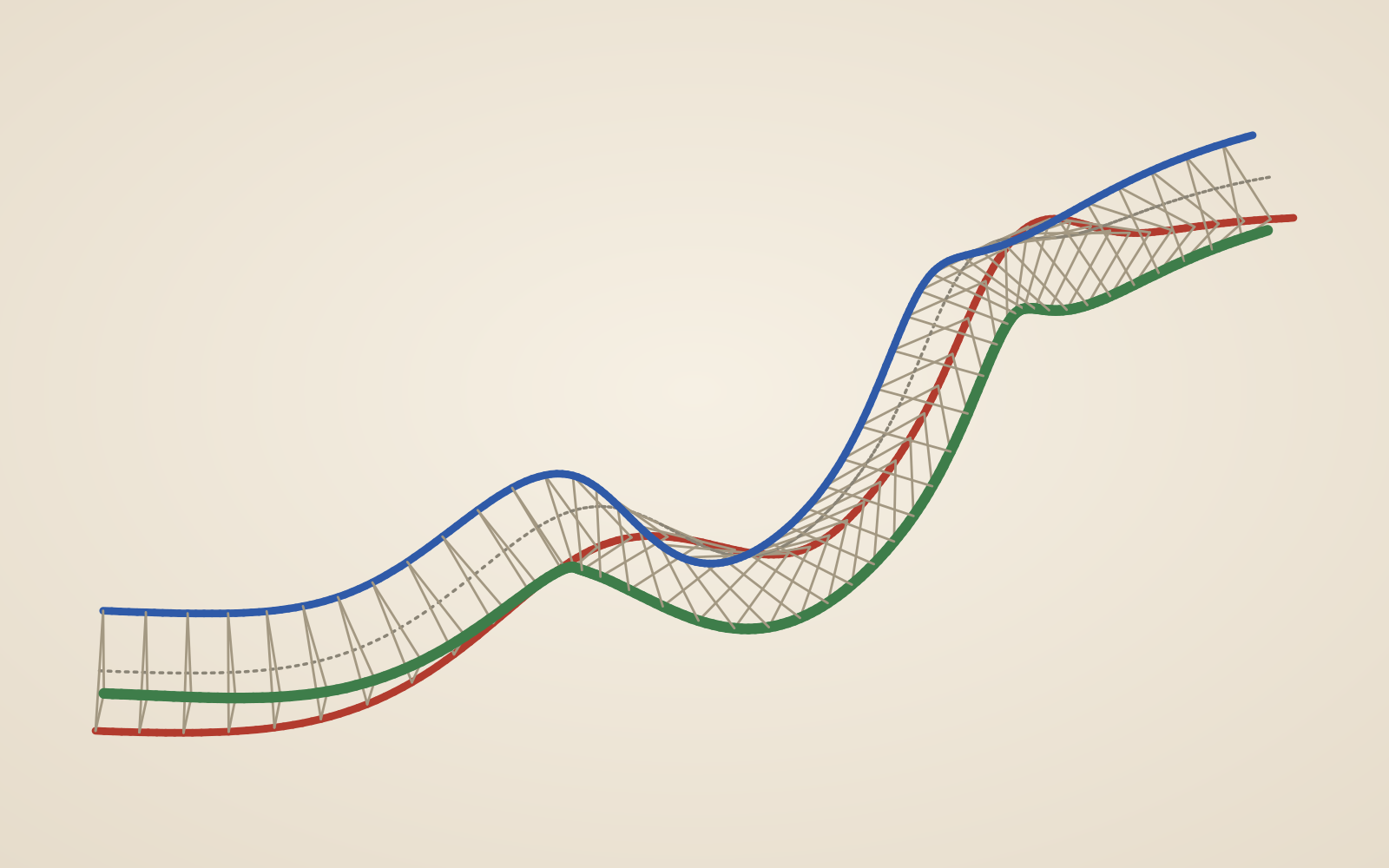
The preview draws the exported centreline dotted, the left rail red, the right rail blue and the spine green, with arrows along the track showing the up vector so the bank can be checked by eye. The title bar repeats the gauge, offset and frame in use.

nolimits-2/assets/matlab-editor.webpCurves CAD will accept
Export writes four curves, the centreline, left rail, right rail and spine, in whichever formats are ticked. CSV and TXT carry a header and point numbers, plus one combined table with all four curves side by side for checking.
The SLDCRV option exists because SolidWorks is strict. Its Curve Through XYZ Points command wants exactly one curve per file, three space-separated numbers per line, and nothing else: no header and no index column. The editor writes each curve to its own file in that form.
SLDCRV files carry no units, so the editor reminds the user, on every export, to set the SolidWorks document to millimetres before importing. Every coordinate the tool writes is in millimetres for exactly this reason.

nolimits-2/assets/solidworks-curves.webpCrossties at an even pitch
The stations in a NoLimits 2 export are not evenly spaced, so the rails cannot simply be joined at every exported point. The next feature resamples the centreline at equal arc length and computes the left-rail, right-rail and spine point at each sample: the three mate points for one crosstie. The planned default spacing is 25 mm.
Cumulative chord length s along the centreline, sampled every Δ millimetres; position and frame are interpolated between the neighbouring stations.
Exported as SLDCRV, each crosstie set becomes a curve whose vertices are those mate points. In SolidWorks, picking one vertex on each of the left-rail, right-rail and spine curves locates a crosstie part exactly. The approach is designed and documented in the editor's notes; the code is the next piece of work, followed by merging the two tools so one page goes straight from a .lwo file to SolidWorks curves.
Sources
- Ole Lange and Mad Data, NoLimits 2 Roller Coaster Simulation, including the Light Pattern Creator and the Professional track export. nolimitscoaster.com
- Buam, nolimits2-csv-exporter (NLCSV), "a simple program to extract the spline of a coaster into a CSV-file like it is possible with the professional license of Nolimits 2." github.com
- NewTek, LightWave Object (LWO2) file format, the
PNTSchunk of big-endian float triplets. - Dassault Systèmes, SolidWorks Help: Curve Through XYZ Points.
- MathWorks, uifigure and app-building components, MATLAB documentation. mathworks.com