Chess Translation
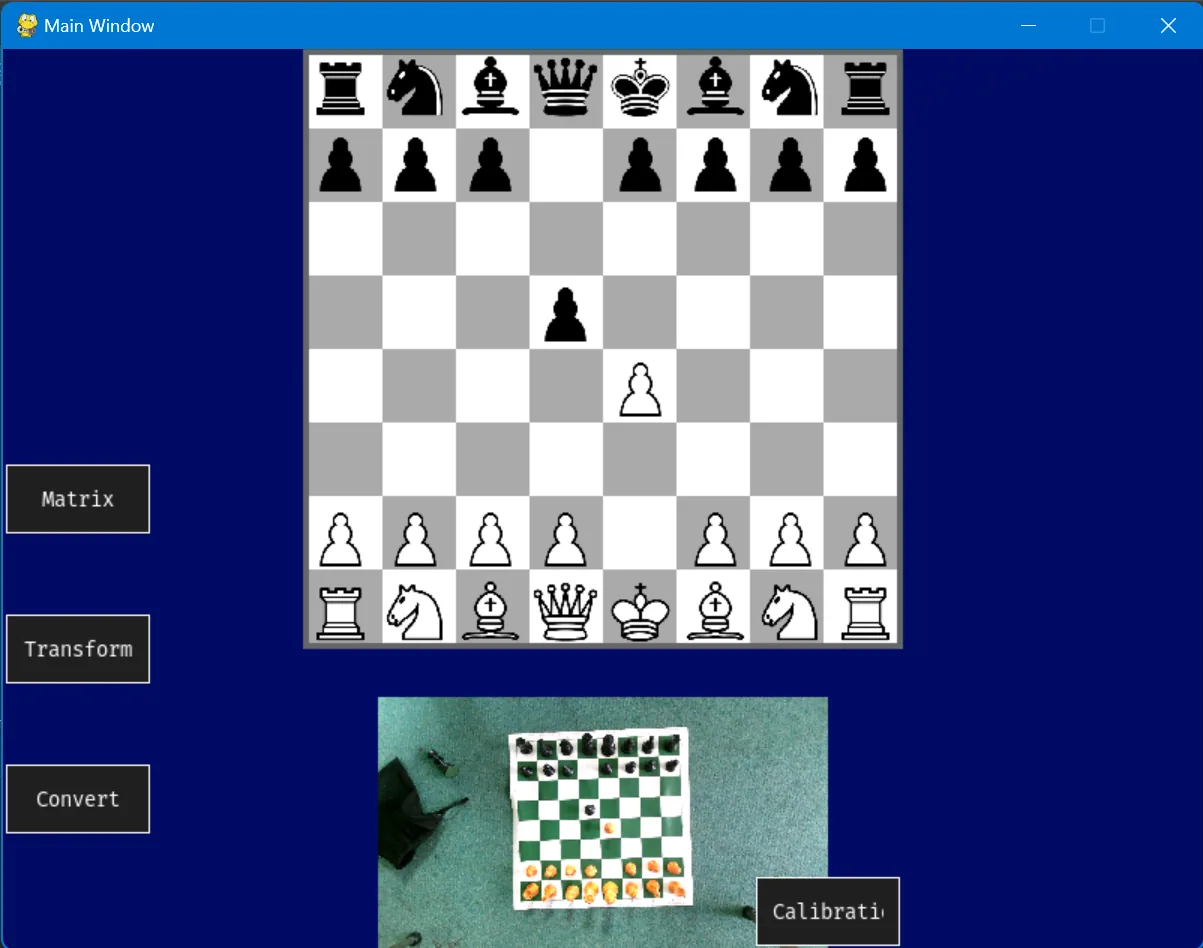
Play on a real board, and the move appears online. A webcam above an ordinary chess set reads the position, works out which piece moved, and plays that move live on Lichess. No special board, no chips in the pieces: just a camera and about 1,600 lines of Python I wrote by hand.
- Course
- OCR A Level Computer Science (H446) programming project
- Timeline
- November 2023 to April 2024, on my own
- Built with
- Python, OpenCV, scikit-learn, python-chess, pygame-gui
- Outcome
- Moves made on a physical board played live on Lichess
A physical object that a computer watches and answers
This was my A Level Computer Science project, and the first big system I built. The idea was simple to say and hard to do: let someone play chess on the set they already own, and have a computer follow the game well enough to play it online for them.
Everything here was written by hand in 2023 and 2024, before AI coding assistants were part of how I worked. Every threshold was tuned against real frames from a real camera, and every bug was found by printing arrays and staring at them. The code isn't how I'd write it today, but the problem-solving is entirely my own, and it's the same loop I now use in themed entertainment work: sense something in the real world, decide what it means, and act on it reliably.
The hard part wasn't the chess. It was getting a cheap camera to agree with itself under real lighting.
Real boards can't talk to computers
Online chess is played with a mouse. If you'd rather move real pieces, your options were electronic boards: DGT boards start at around £150 and read a chip in every piece, and Square Off adds a magnet under the board to move pieces for you. Both need their own proprietary set, and a lost piece has to be bought back from the maker.
I wanted to see if a webcam could do the same job with any set. I interviewed two stakeholders, a teacher who plays online and a student who plays over the board, and their answers set the brief: reliable board recognition, a simple interface, painless calibration and a real connection to an online platform.
Success criteria
Before writing any code, I set measurable targets for the finished program.
| Criterion | Target |
|---|---|
| Accuracy | At least 90% of moves detected correctly across a game |
| Response time | Under 5 seconds from capture to the move being played online |
| Compatibility | Work with three online chess platforms, by API or by mouse |
| Error handling | Catch illegal or invalid moves every time |
| Ease of calibration | A new user set up in under two minutes |
| Simple and lightweight | Low CPU and GPU load while still doing everything it needs to |
| Quality of life | Every option easy to find and understand |
Breaking it down before building it
I decomposed the problem into a chain of smaller ones: find the board, capture it, work out the game state, find the move, and play it. Each step depends on the one before, so I built them in order and proved each one before moving on.
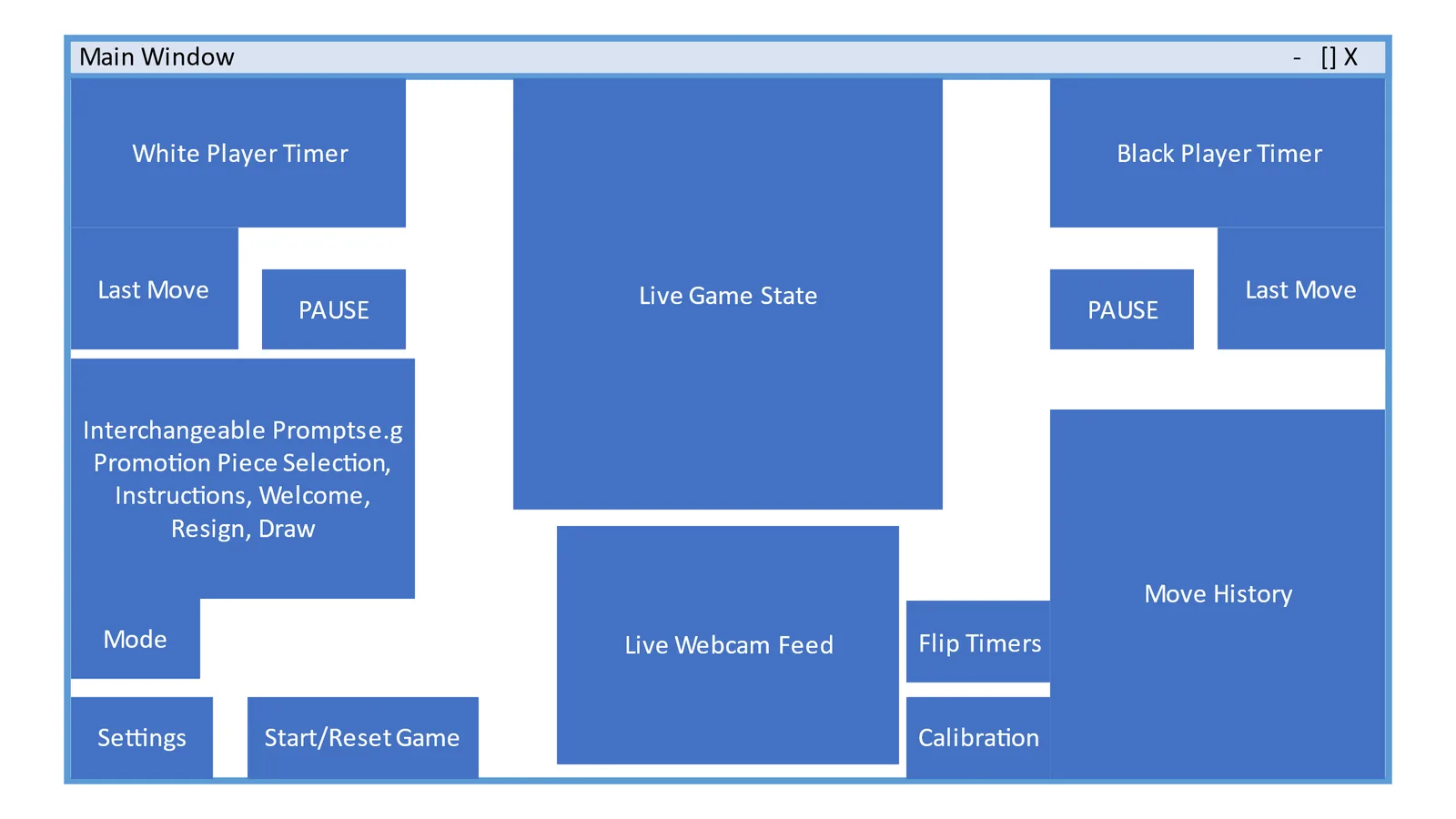
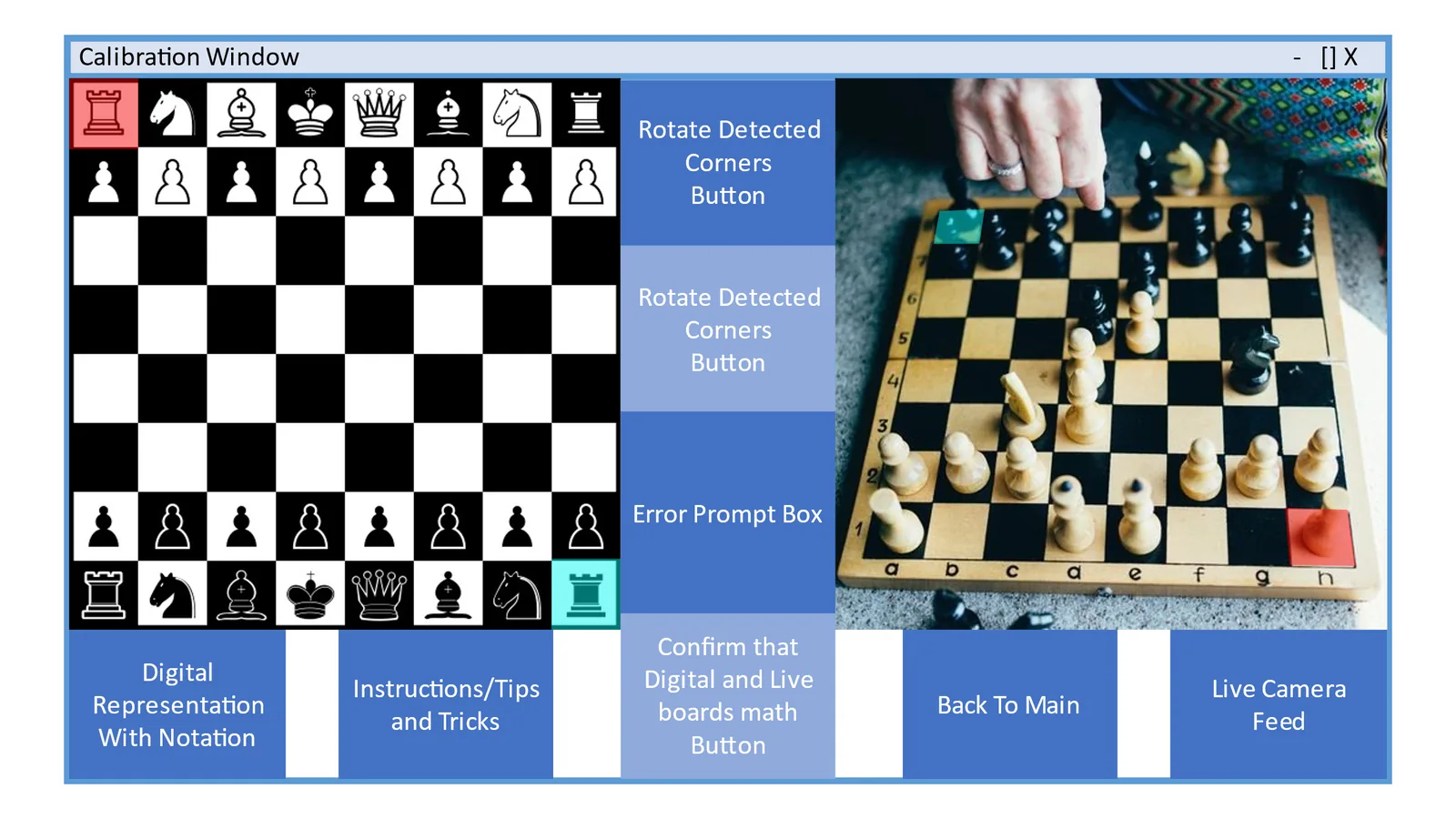
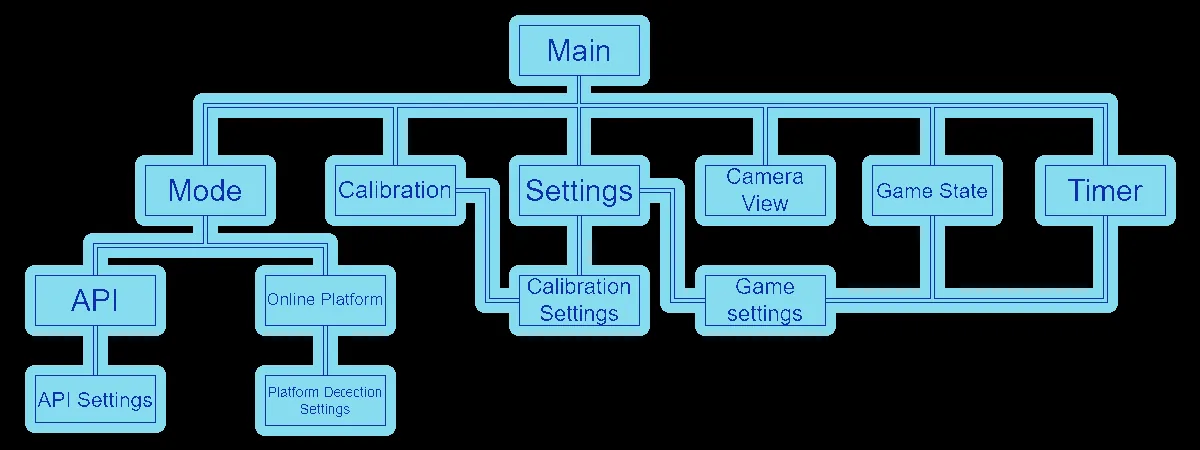
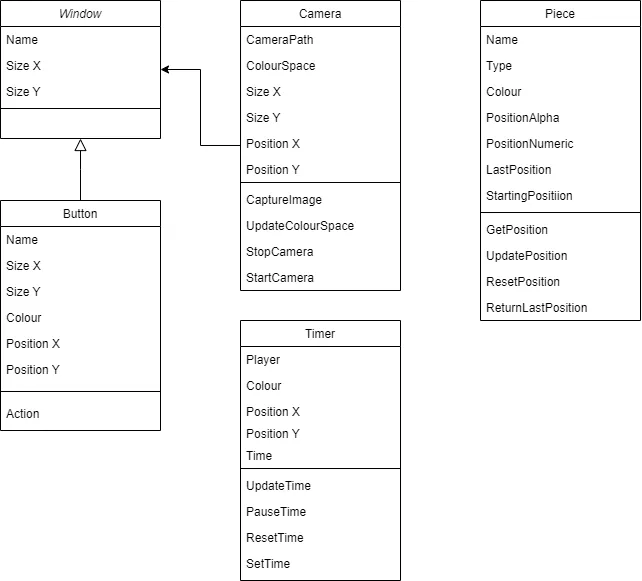
I planned the interface as a set of separate windows, so no single screen was cluttered, and modelled the program as classes from the start: a window class that new screens could extend, a camera class, and separate classes for translation, detection and the game engine.
From a tilted photo to 64 clean squares
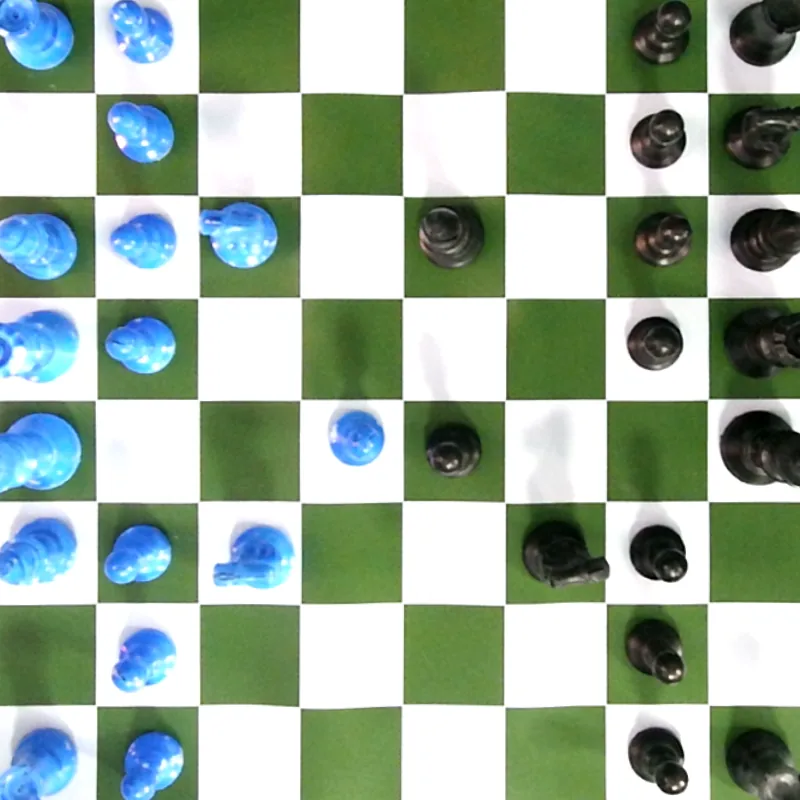
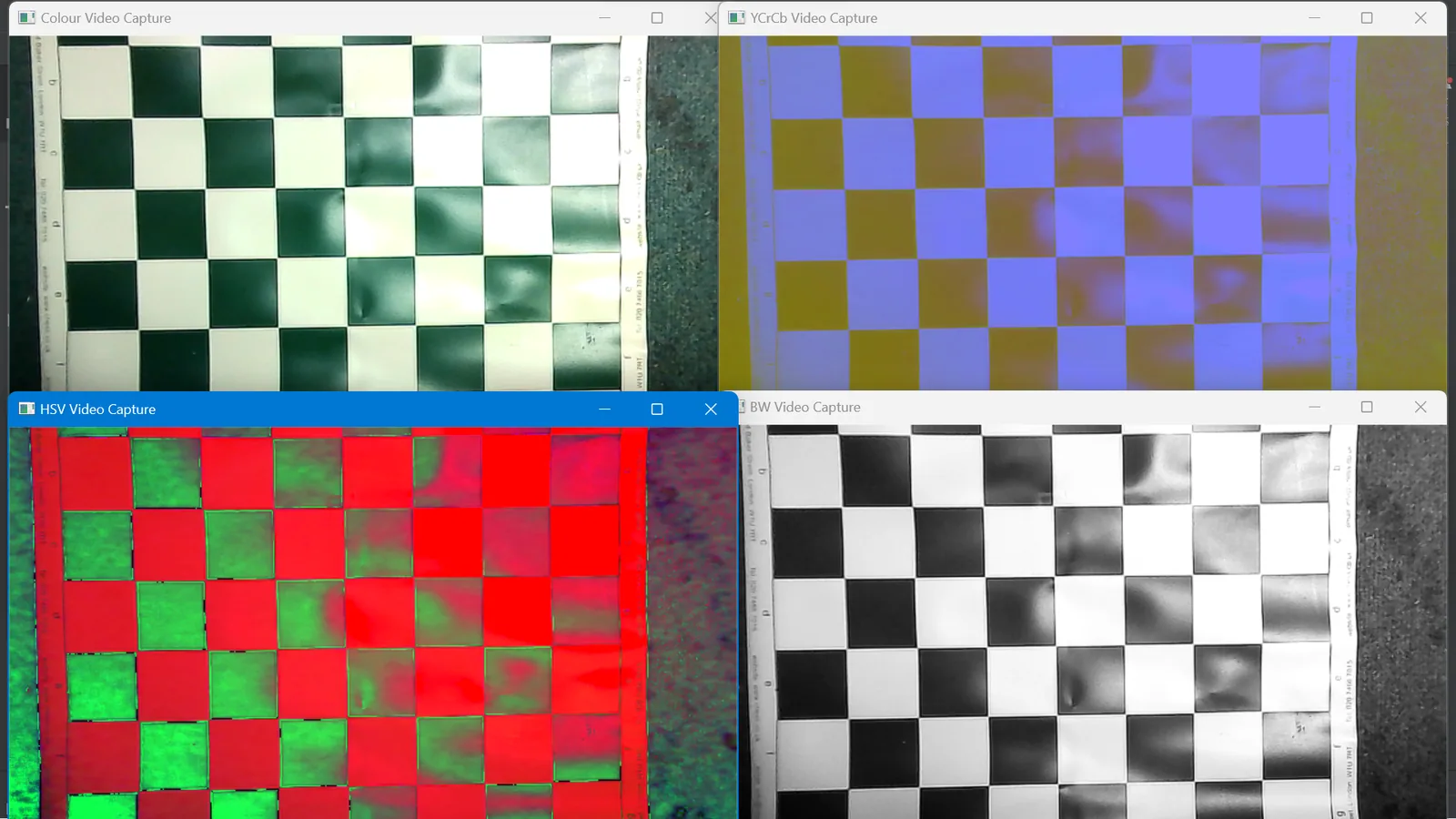
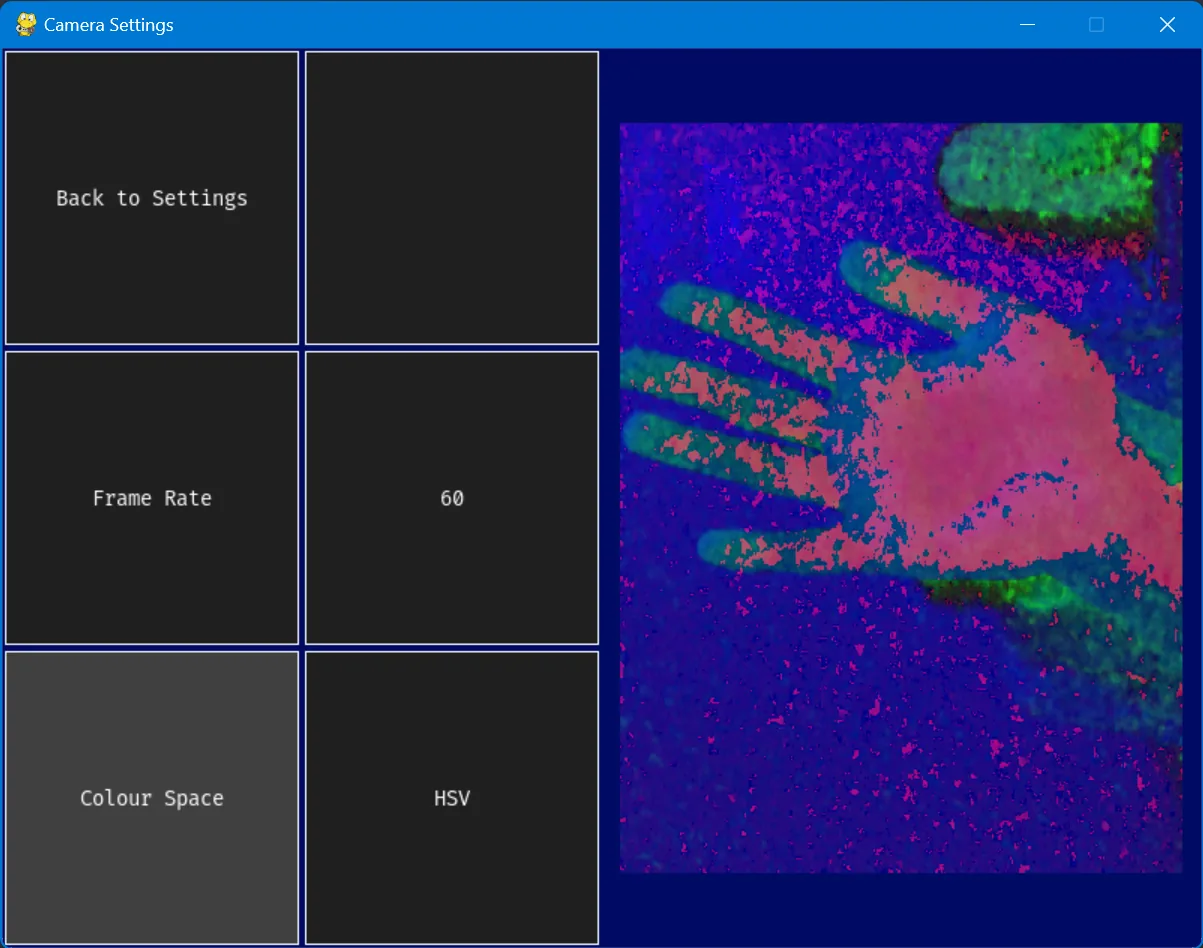
The first job is turning a webcam frame into something regular: a square, flat board where every chess square is exactly the same size. I began by viewing the feed in four colour spaces (colour, black and white, HSV and YCrCb) to see which gave the board the most contrast.
When the obvious tool failed
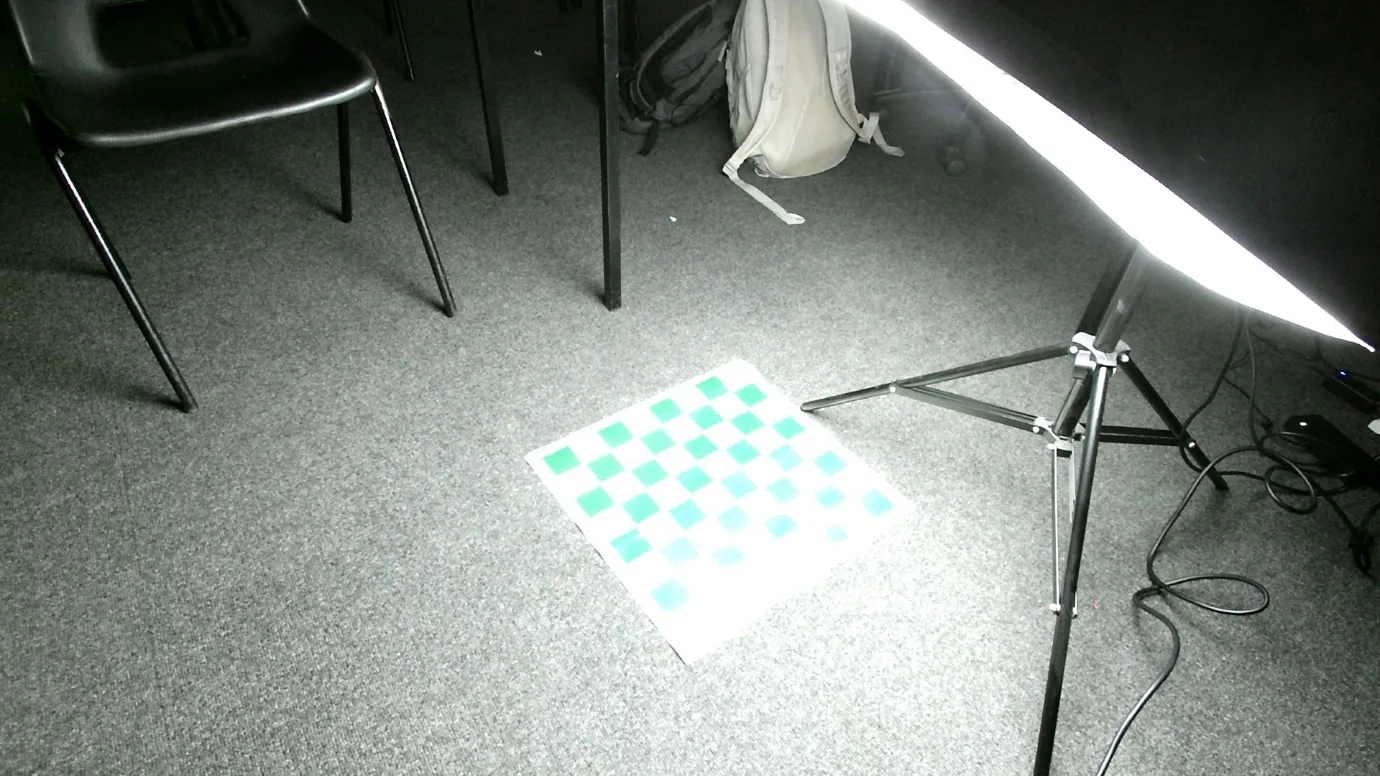
OpenCV has a built-in findChessboardCorners(), made for camera calibration targets. It failed in three ways. It only finds the inner grid, so once pieces covered it, it found nothing. It couldn't tell which side was the top, because a chessboard looks the same rotated. And glare from the ceiling lights broke it completely. I tried a studio light to overpower the glare, which only made more of it. Turning the ceiling lights off worked.
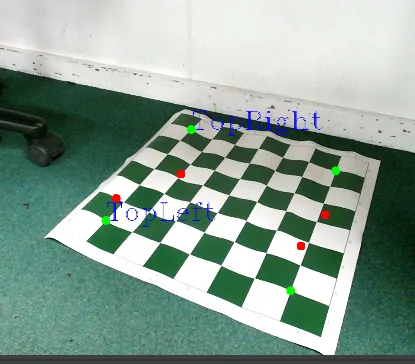
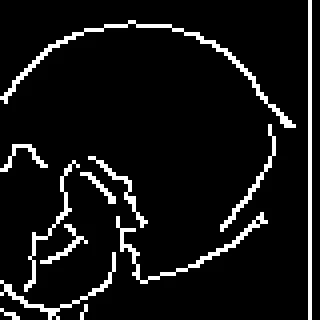
So I changed approach. The board is the largest object in the frame, so I run Canny edge detection, find the contours, keep the largest one and simplify it to its four corners. Those corners give a perspective transform (a homography), which warps the board flat to 900 × 900 pixels. Cropping the white border leaves 800 × 800, which splits neatly into 64 squares of 100 pixels each.
One more trick made it robust: the warp matrix is calculated once during calibration, on an empty board, and saved. Every later frame reuses it, so pieces on the board can never confuse the corner finder.
Why the camera has to be overhead
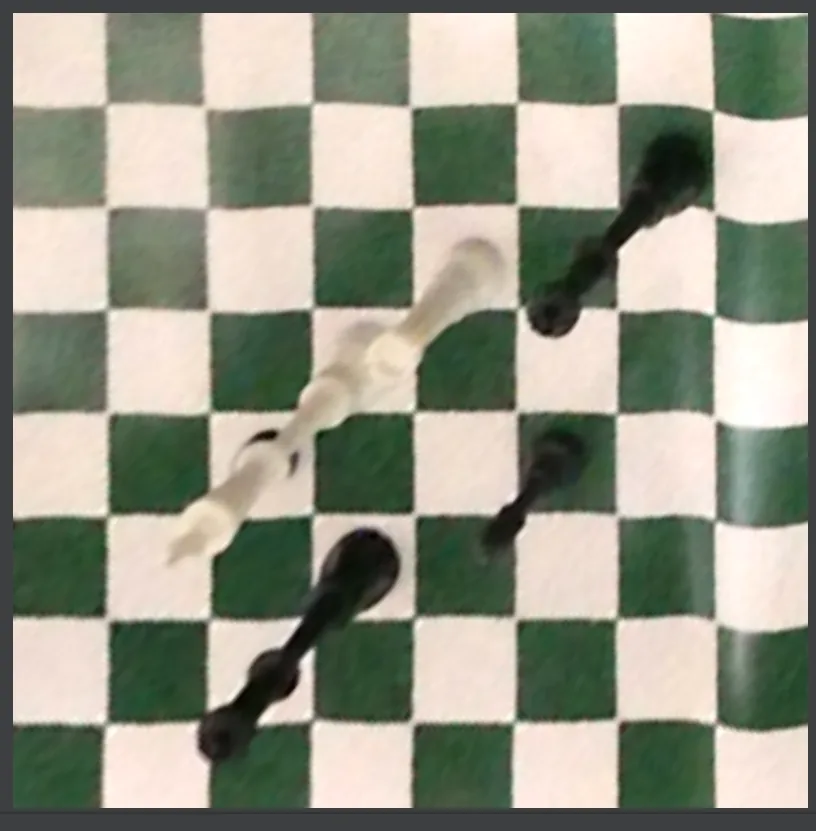
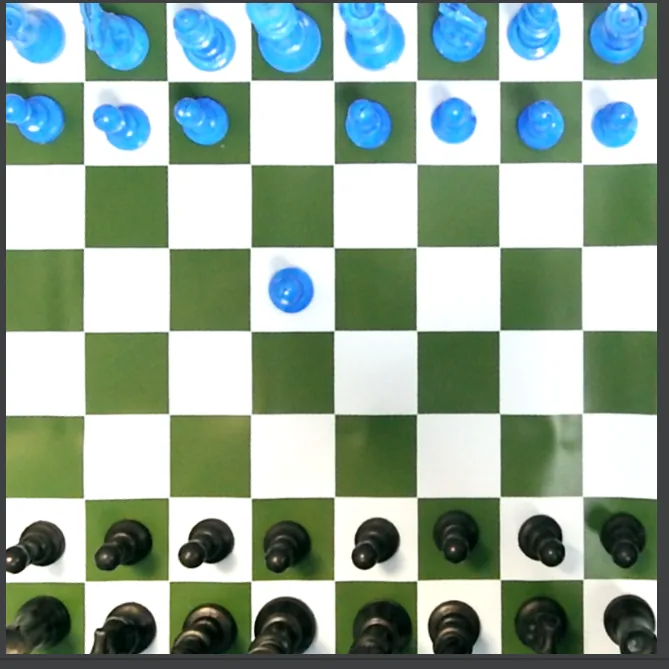
With the camera off to one side, the warp stretches tall pieces across the squares behind them, so one piece appears to occupy two or three squares. Straight overhead, each piece stays inside its own square. That became a hard requirement of the setup.
Five opinions are better than one
Each 100-pixel square is cropped in from its edges to remove stray lines, then tested. My first single test worked until I found a white piece on a white square, which it simply couldn't see. Rather than chase a perfect detector, I changed the physical setup: I swapped the white pieces for an orange set, and later a blue one, so the pieces always contrast with both square colours.
Lighting still moved the thresholds around, so I stopped trusting any single test. I wrote three kinds of occupancy check, each with versions tuned separately for light and dark squares:
- Edges: blur the greyscale square, run Canny, and count edge pixels. A piece adds a lot of edges to a flat square.
- Colour: compare the square's mean colour with a calibrated empty square of the same colour.
- Contours: threshold to pure black and white and check whether the centre is the opposite colour to the square.
Five of these checks run on every square, and if three or more say "occupied", the square is marked as occupied. It's the same idea as redundant sensors on a ride: no single reading has to be perfect, as long as most of them agree.


The capture problem
With a grid of 1s and 0s, ordinary moves worked: one square empties, another fills. Then I tried a capture, and it broke. When a pawn takes on d5, d5 was occupied before and is still occupied after. Only one square changes, so there's no way to tell where the piece went.
The fix was to record which side is on each square, not just whether something is there: 0 for empty, 1 for the blue pieces and 2 for black. Now the captured square visibly changes from 2 to 1, and the move falls out of the comparison.
Before 2.exd5
Blue pawn on e4, black pawn on d5.
After, occupied or not
e4 empties, but d5 reads "occupied" both times. Move not found
After, with colours
e4 empties and d5 turns from black to blue. e4 → d5 found
Three ways to tell blue from black
Telling the colours apart under changing light needed the same voting idea again. Shadows were the worst offender: a shadow over a blue pawn could make it read as black. I wrote three colour detectors and let the majority decide:
- HSV masks: convert to hue, saturation and value, and check for pixels inside a blue range or a black range.
- k-means clustering: group the square's pixels into three colour clusters with scikit-learn, take the biggest cluster and check which range it falls in.
- HSV histogram: build hue histograms through each mask and see which colour is actually present.
Each works best in different conditions. Together they made the colour reading reliable across the lighting and camera positions I tested.
From two grids to a move online
Comparing the previous grid with the new one gives a "from" square and a "to" square. That pair is exactly UCI notation (e2e4, e4d5), which I chose over standard algebraic notation because it needs no knowledge of which piece moved. The python-chess library checks the move is legal and keeps the digital board in step.
Then the move goes online. Chess.com's public API only reads statistics, so it can't play. Lichess has a Board API built for exactly this, so the program finds my current game and posts each move to it. The first moves played from the physical board went through on 21 February 2024:
[Site "lichess.org"]
[Date "2024.02.21"]
[White "FrankiePang"]
[Black "lichess AI level 1"]

1. e4 e5 2. f4 Nc6
I had also planned to drive Chess.com and other sites by moving the mouse automatically. I dropped it once I saw the conflict: the user presses a button in my app to capture each move, so the browser would have to take focus back in time for a fake mouse to click. An app that watched the board and triggered itself would solve that, and it's the first thing I'd change.
Calibrate once, then just play
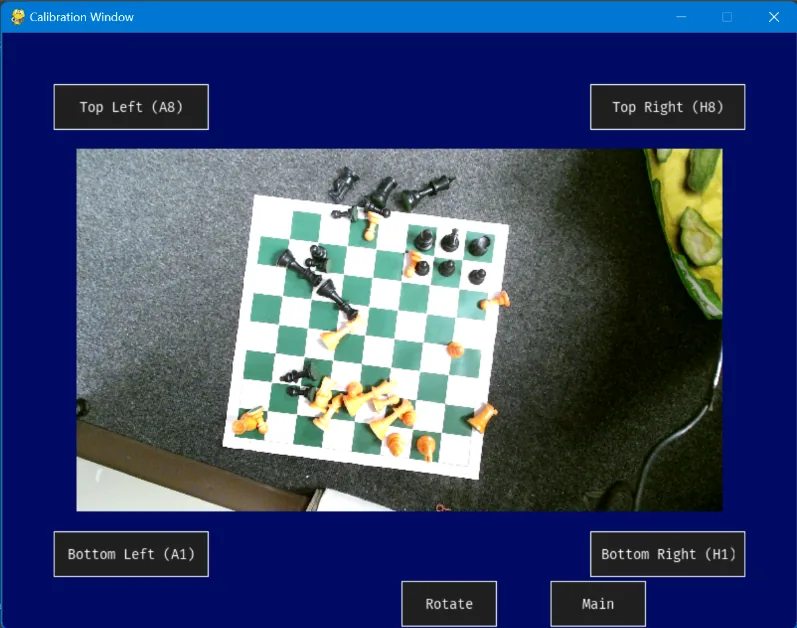
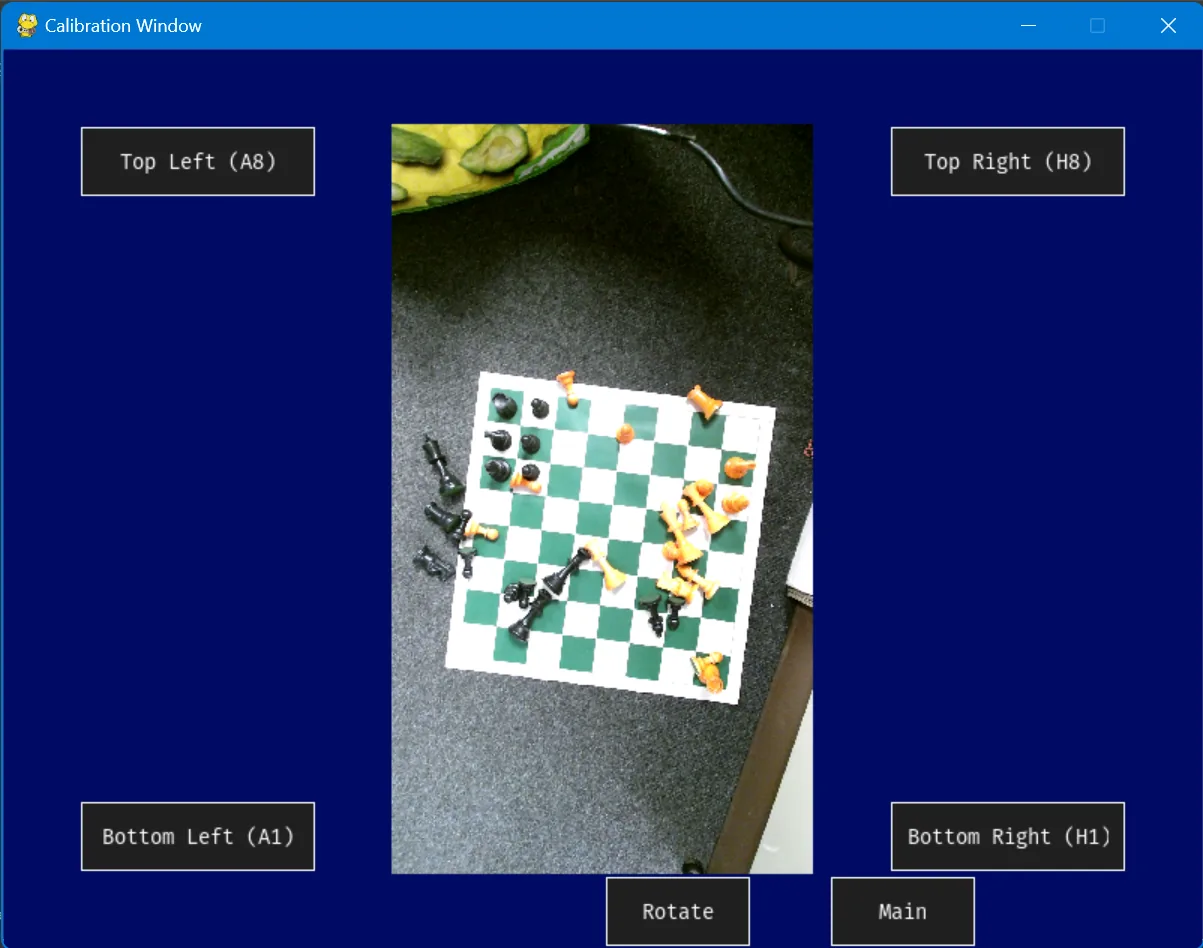
The interface is built with pygame-gui, which styles windows with JSON theme files much like CSS. I made a light theme and a dark theme that switch every window at once. Calibration is one button: point the camera, rotate the view if the board is sideways, and capture the matrix on an empty board.
Two performance lessons came from the app rather than the vision. Left running for a minute, the frame rate collapsed, because the main loop redrew the whole board every frame. A simple "needs update" flag fixed it. Starting the camera on more than one thread hung the program, which taught me to keep one owner for each resource.
What worked, and what didn't
I wrote an 18-point test plan before building, logged development day by day, and finished with a survey of my two stakeholders and the school chess club. The core goal worked: the program captures the board, updates the digital game and plays the move online. The survey agreed on accuracy, calibration and the interface, and was rightly critical elsewhere.
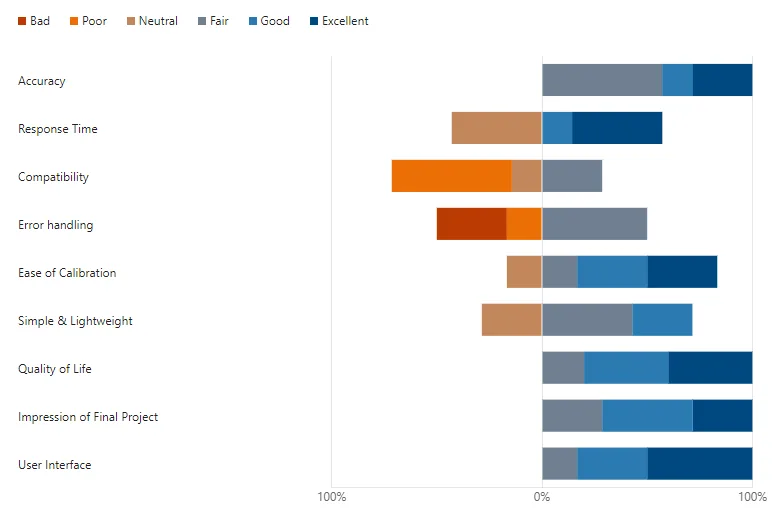
| Area | Result | Why |
|---|---|---|
| Accuracy | Strong | High and repeatable once the voting detectors were in, in the lighting I tested. |
| Calibration | Strong | One button press on an empty board. |
| Interface | Strong | Separate, uncluttered windows with consistent buttons and two themes. |
| Response time | Mixed | Fast on a modern PC, slow on an older laptop, so the image processing has room to be optimised. |
| Compatibility | Weak | Lichess only. The output is standard UCI, so other platforms could be added. |
| Error handling | Weak | An illegal move stopped the program instead of asking the player to fix the board. |
| Clocks, board flip | Not built | The Lichess API doesn't expose the game clock, and flipping clashed with how I'd indexed the board arrays. |
There were limits I'd now call out up front, too. Castling, en passant and promotion change more than two squares, which a simple two-square comparison doesn't cover. The thresholds were tuned by hand for my room. And the player has to press a button after every move.
What I'd keep, and what I'd change
- Change the world, not just the code. Swapping the white pieces for a coloured set and switching off the ceiling lights fixed problems no threshold could. In attractions, the environment is part of the system too.
- Don't trust one sensor. Voting across several imperfect tests was more reliable than any single clever one. It's the same thinking behind redundant sensing in show control and ride systems.
- Calibrate once, reuse forever. Saving the warp matrix from an empty board took the fragile step out of every move.
- Ask the rules, not just the pixels. Today I'd compare the camera's grid with the result of every legal move and pick the closest match. That would handle castling, en passant and promotion, and shrug off a misread square.
- Let the system trigger itself. Watching for the frame to settle after a hand leaves the board would remove the button, and with it the clash that blocked mouse control.
I'd build it very differently now, with a trained piece classifier and AI tools to speed up the code. But working it out by hand is how I learned to break a messy real-world problem into steps, test each one against reality, and keep going when the obvious tool fails.
The full write-up is my OCR A Level programming project report, "Physical To Digital Chess Translation Using Camera Vision" (May 2024). The source code is on GitHub.